SOCIAL_MEDIA

Mushy tells you how your social media is doing and helps you keep posting.

One place for LinkedIn, X, YouTube and Instagram: plain answers about what's working, a queue that keeps you posting, the comments that need you, and agents that do the heavy lifting while you approve what goes public.

  • LinkedIn
  • X
  • YouTube
  • Instagram

Five jobs Mushy does for you

Screens are from Mushy's design prototype; captures of the app replace them at launch.

JOB_1

Know if it's working

Clear engagement metrics that tell the story at a glance: up or down, which channels carry your brand and which posts landed.
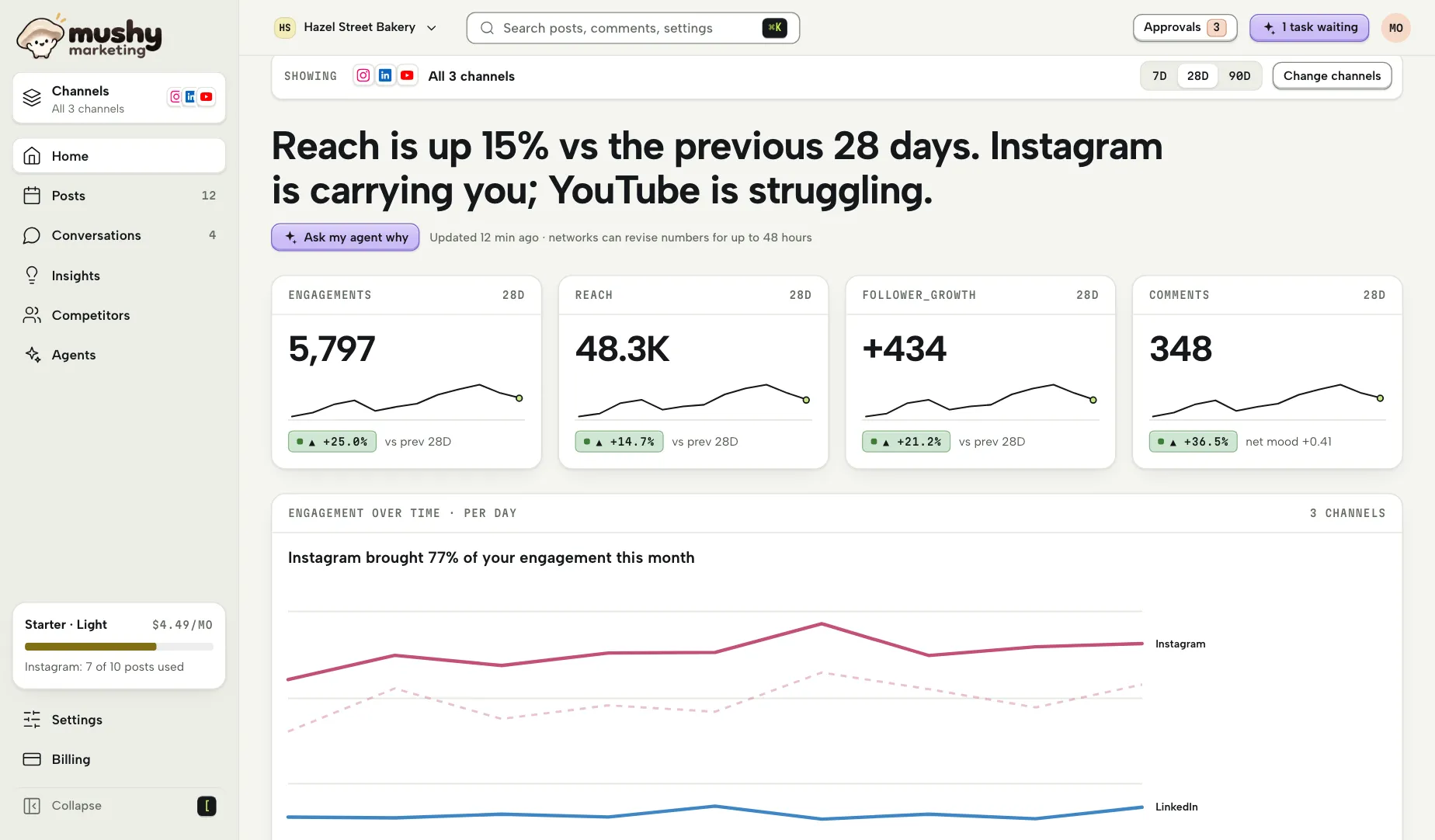

Mushy Home: a one-sentence answer saying reach is up 15% and which channel is carrying the brand, four metric tiles for engagements, reach, follower growth and comments, and an engagement-over-time chart for each channel.

JOB_2

Post consistently with little effort

A queue that fills itself, from your agent or by hand, that is easy to find and review, and that publishes reliably.
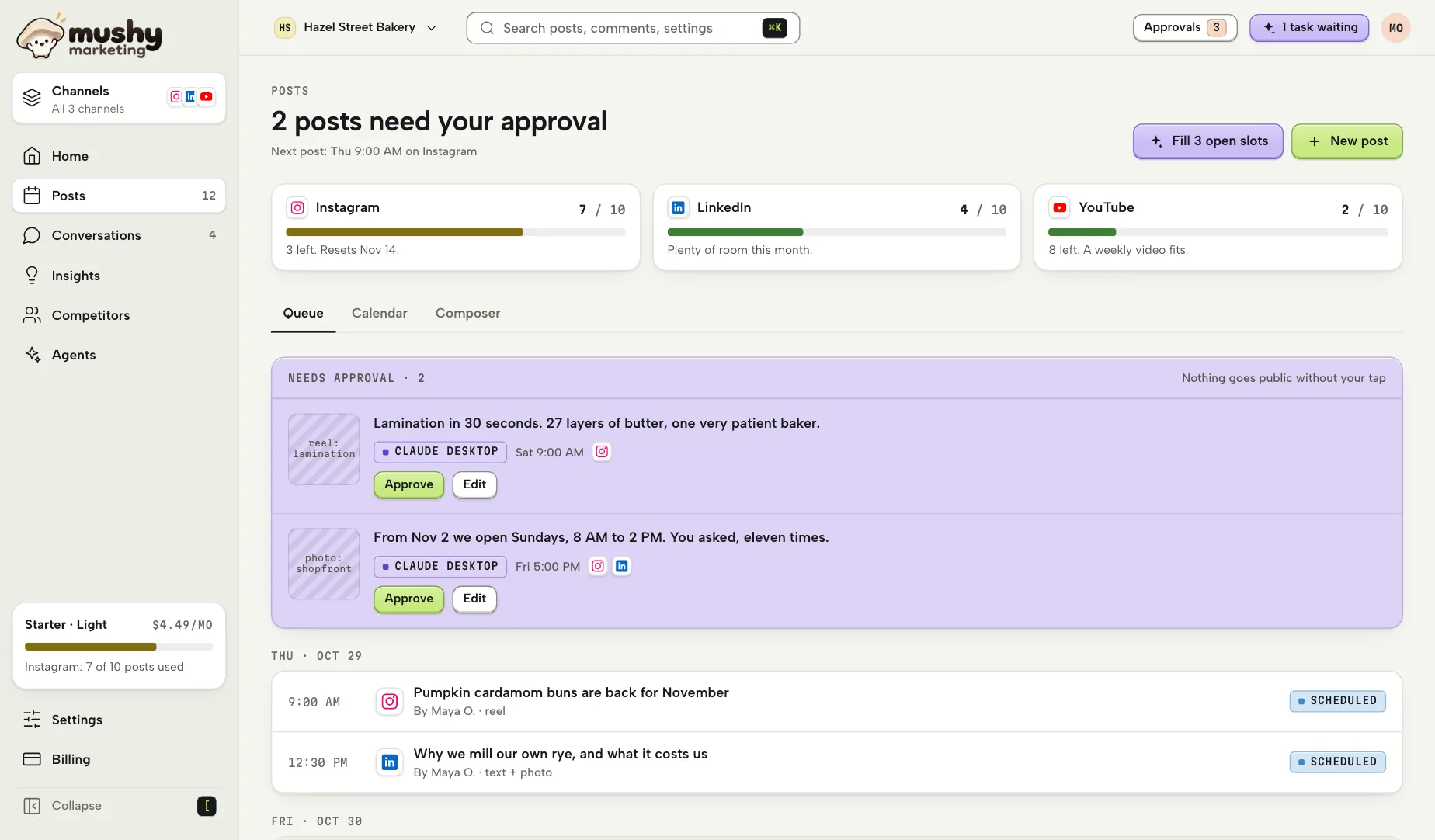
Mushy Posts: each channel's posts left this month, two agent drafts waiting in Needs approval with Approve and Edit buttons, and the scheduled queue by day.

JOB_3

Hear what people are saying

The mood, the unanswered questions, the complaints and the praise, plus deeper themes and summaries from an agent.
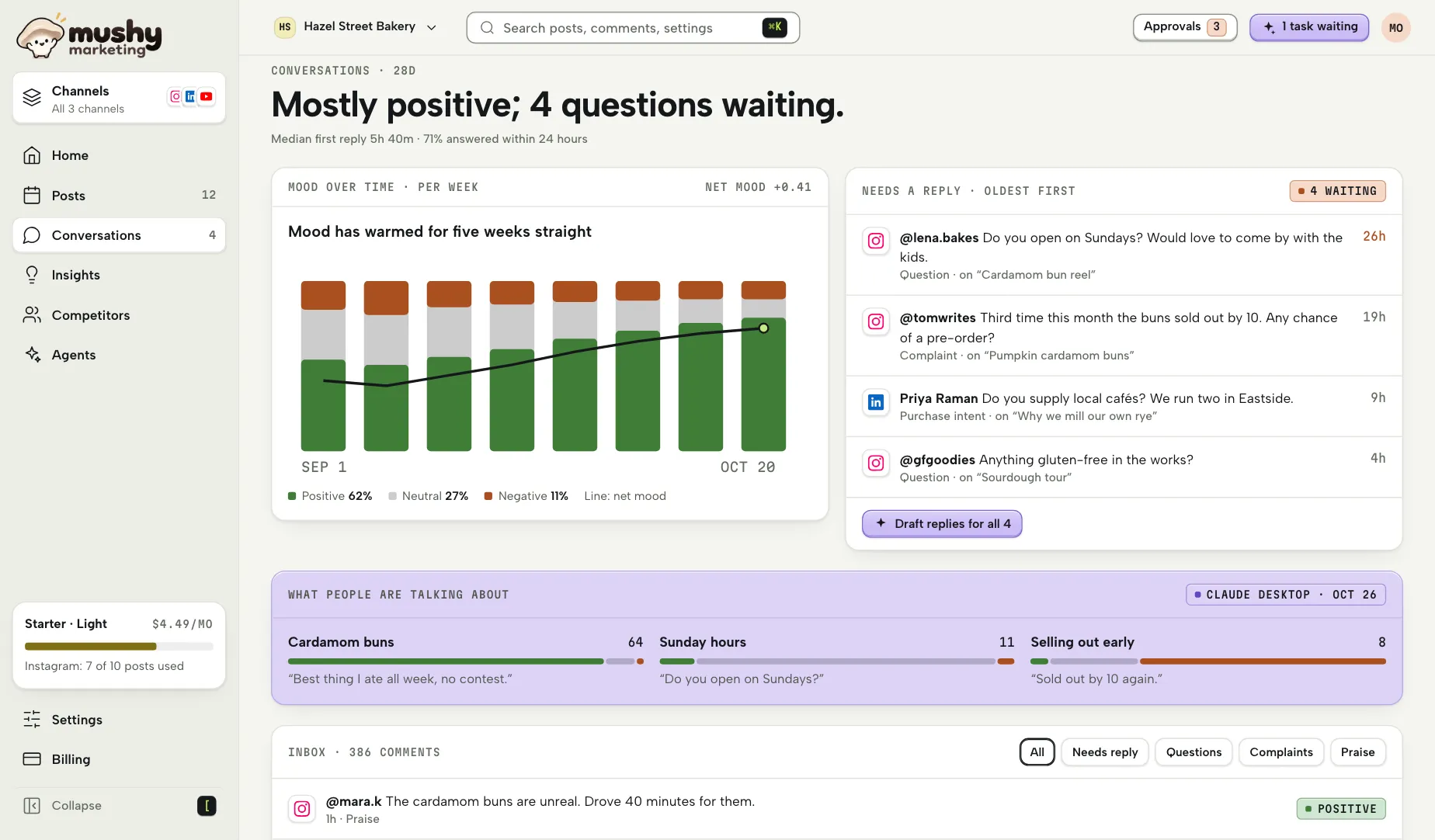
Mushy Conversations: "Mostly positive; 4 questions waiting", a weekly mood chart, the comments that need a reply, oldest first, and the themes an agent found.

JOB_4

Let an agent help without getting burned

Your agent analyzes, drafts and schedules. Nothing goes public without a tap, and a clear record shows what it did.
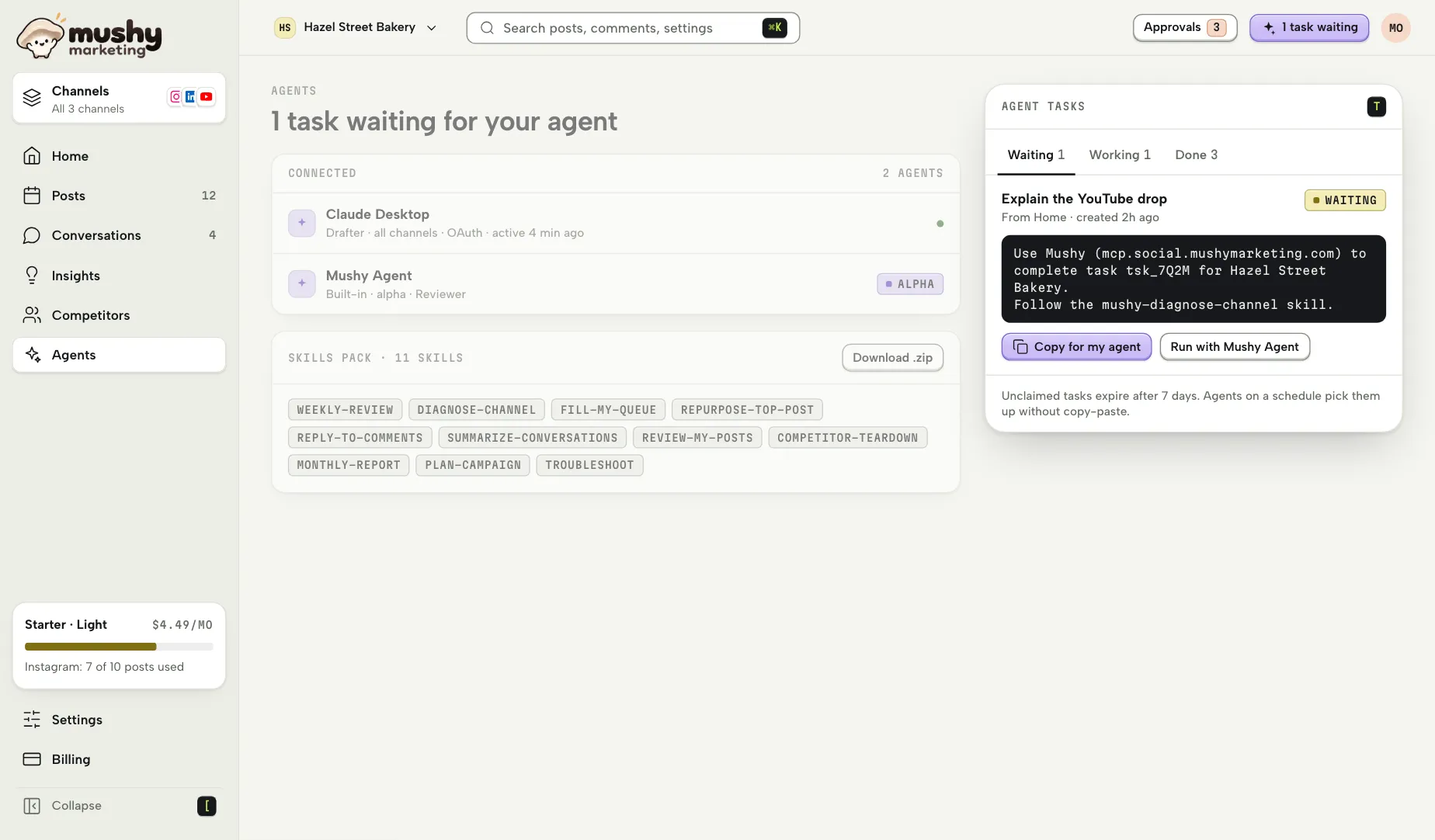
Mushy Agents: the connected agents with their roles, the downloadable skills pack, and an agent task waiting with its hand-off snippet and a Copy for my agent button.

JOB_5

Pay little and never be trapped

Cheap monthly plans, one-click cancel and no seat fees.
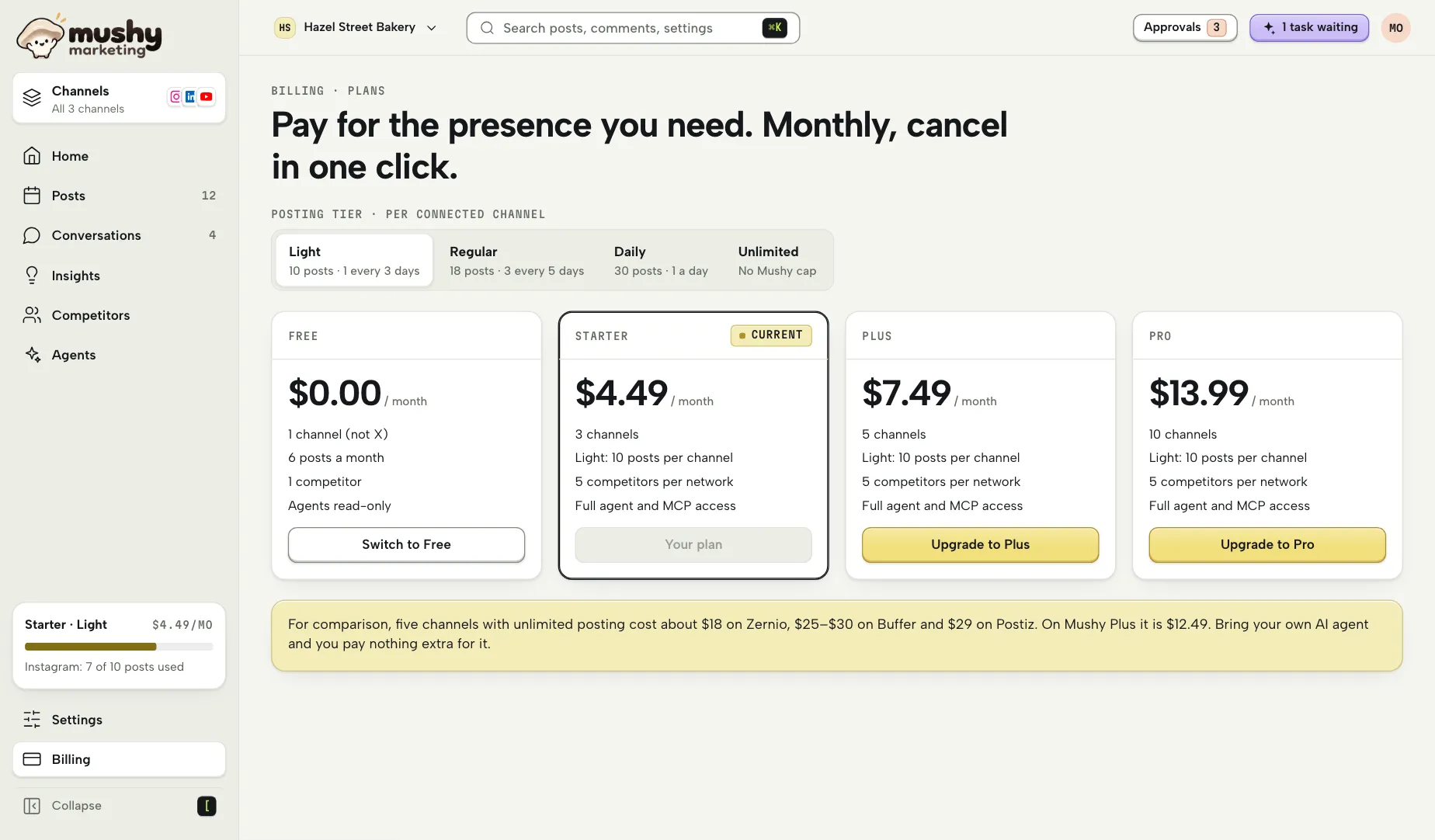
Mushy Billing: the Free, Starter, Plus and Pro plans side by side, with a posting tier switch and monthly prices.

Agents

Bring the AI assistant you already pay for, or use Mushy's own. Agents read Mushy's scores, run the deeper analysis and write their findings back to your dashboard.

MCP server

Every read and write the app can do, as tools, at https://mcp.social.mushymarketing.com/mcp. Your agent can do anything a teammate with the same role can.

Skills pack

Downloadable instruction packs for common jobs, such as a weekly review or filling your queue, so agents do them well and consistently, with the right tools and output format.

Mushy Agent, powered by Claude

Alpha

Mushy's hosted agent, built on the Claude Agent SDK, for one-click agent work without your own agent. It uses the same tools and skills as yours. Invite-only during the alpha.

Nothing goes public without a person

Agents can draft, schedule and propose replies, but anything they want to make public waits in Needs approval until a person with Poster rights approves it. An agent is never more than a Drafter, can't change its own permissions or approve its own work, and every action it takes is in the activity log.

Read the agent guides in the documentation

Four networks

At launch, every post goes out as one post per channel: text with images or text with one video.

LinkedIn

Connect
Personal profiles and company pages.
Publish
Text with images or one video. Documents come after launch.
Analytics
Pages: full post and follower stats. Personal profiles: each post's impressions, members reached, reactions, comments, reshares, saves, sends and link clicks, followers gained and profile views, video plays, viewers and watch time, and your follower count.
Limits
Profiles can post from the start. Profile analytics, comments and post history, and company pages, need LinkedIn to approve Mushy's Community Management API access; until then a profile shows “Analytics pending LinkedIn approval”.

X

Connect
Personal and brand accounts.
Publish
Text with images or one video. Threads come after launch.
Analytics
Post metrics and followers.
Limits
X charges for each post and reply, and Mushy passes the cost on at X's price plus 20%: $0.018 a post, $0.24 a post with a link and $0.012 a reply, on its own invoice line, within a monthly spending cap the Owner sets. Free can't connect X. Mushy replies only to people who mentioned, quoted or replied to you, and agents can't draft X replies until X confirms in writing that it allows them.

YouTube

Connect
Channels.
Publish
Videos and Shorts, each with a title of up to 100 characters and your copy as its description. Made for kids defaults to “not made for kids” and can be changed in the composer.
Analytics
Views, watch time, likes, comments and subscribers.
Limits
YouTube gives Mushy a daily upload quota shared by every customer, so each workspace has a daily upload cap and the composer tells you when an upload will wait for quota.

Instagram

Connect
Business and Creator accounts linked to a Facebook Page.
Publish
Images, carousels and Reels. Stories come after launch.
Analytics
Reach, impressions, engagement and followers, plus lookups of competitors' public professional accounts.
Limits
Personal Instagram accounts can't connect. Accounts connect through Facebook Login for Business, which competitor lookups need; Mushy shows you how to link a Facebook Page if you don't have one.

How X usage is billed

Security in brief

What you trust Mushy with is the right to speak as your brand, so security centres on three things: network tokens nobody can read, each workspace sealed off from every other, and nothing going public without the right person's approval.

Passkeys first, no passwords
Sign in with a passkey, an email link or code, Google or Apple. Sensitive actions ask you to check again.
A token vault for each workspace
Network tokens are sealed when you connect and open only in the workers that publish and sync. They never appear in logs, in your browser or in anything sent to a model, and disconnecting destroys them.
Workspace isolation
Every workspace is a separate tenant, enforced by row-level security in the database, and an automated test checks that no workspace can reach another's data.
Approvals
Drafters' and agents' posts and replies wait for a person with Poster rights. Card details stay with Stripe and never touch Mushy.

What Mushy does with each network's data

Mushy reads what it needs to show your analytics, publish your posts and videos, help you answer comments on your own posts and videos and compare you with tracked competitors using their public posts, videos and statistics on Instagram, YouTube and X. Tracking needs a connected channel on that network. Competitors' posts and videos are kept for a rolling 90 days; untracking deletes their posts, videos, follower history and subscriber history at once. Mushy uses only official APIs and public data, never scraping. Network data and commenter data are never used to train models and never shared between workspaces.

LinkedIn

What Mushy reads
Your posts and their statistics, page and follower stats, profile analytics once LinkedIn approves them, and comments on your posts with their authors' names and photos. Competitor tracking isn't available on LinkedIn: its API doesn't offer other members' or companies' posts.
Why
To publish for you, chart how your posts do and let you answer comments.
How long Mushy keeps it
  • Comment text: 48 hours from when Mushy first fetched it, then only the comment's ID, time, parent post and Mushy's labels.
  • Commenters' names and photos: 24 hours from each fetch, after which they show as “LinkedIn member”.
  • Your posts, metrics and scores: while the channel is connected, then 90 days, or less where LinkedIn's storage rules require it.
How to remove access
Disconnect the channel in Mushy under Settings › Channels. You can also remove Mushy on LinkedIn under Settings & Privacy › Data privacy › Permitted services.

X

What Mushy reads
Your posts and their metrics, your followers, and replies to, quotes of and mentions of your account. For competitors you track: their public posts and statistics, including followers and each post's likes, reposts, replies, views, text and time.
Why
To publish for you, chart how your posts do and let you reply to people who mentioned, quoted or replied to you. Mushy also compares your account with the competitor accounts you track.
How long Mushy keeps it
  • Any X content is removed within 24 hours of X telling Mushy it was deleted.
  • Your posts, metrics and scores: while the channel is connected, then 90 days.
  • Comments: while the post and channel are connected, then deleted within 30 days after the post is deleted, in Mushy or on the network, or the channel is disconnected.
  • Competitors' posts: a rolling 90 days; their posts and follower history are deleted at once when you stop tracking the account.
How to remove access
Disconnect the channel in Mushy under Settings › Channels. You can also revoke Mushy on X under Settings and privacy › Security and account access › Apps and sessions › Connected apps.

YouTube

What Mushy reads
Your channel's videos, their views, watch time, likes and comments, and your subscribers. For competitor channels you track: their public videos and statistics, including subscribers (rounded by YouTube) and each video's views, likes, comments, title, duration and publish time.
Why
To upload your videos, chart how they do and help you answer comments on your own videos. Mushy also compares your channel with the competitor channels you track. Scores and rates Mushy works out are labelled as Mushy's, not YouTube's.
How long Mushy keeps it
  • Stored YouTube data follows the YouTube API Services refresh or delete rules.
  • Competitors' videos: a rolling 90 days; their videos and subscriber history are deleted at once when you stop tracking the channel. For YouTube competitors, Mushy keeps only each video's latest statistics, refreshed daily, never a statistics history older than 30 days.
  • After you revoke access, Mushy deletes the channel's imported video data, metric snapshots and comments within 7 days if you revoked in Mushy, and within 30 days if you revoked on Google's side. Videos you made in Mushy stay.
How to remove access
Disconnect the channel in Mushy under Settings › Channels. You can also revoke Mushy on Google's third-party access page; Mushy honours a revocation at once. YouTube use is also covered by the YouTube Terms of Service and the Google Privacy Policy.

Instagram

What Mushy reads
Your posts and their reach, impressions and engagement, your followers and comments on your posts. For competitors you track: public posts and statistics from professional accounts that aren't age-gated, including followers, post count and each post's likes, comments, views, caption, time and type.
Why
To publish for you, chart how your posts do and help you answer comments on your own posts. Mushy also compares your professional accounts with the competitor professional accounts you track.
How long Mushy keeps it
  • When you ask Meta or Mushy to delete your data, Mushy deletes your Instagram data within 30 days.
  • Your posts, metrics and scores: while the channel is connected, then 90 days.
  • Comments: while the post and channel are connected, then deleted within 30 days after the post is deleted, in Mushy or on the network, or the channel is disconnected.
  • Competitors' posts: a rolling 90 days; their posts and follower history are deleted at once when you stop tracking the account.
How to remove access
Disconnect the channel in Mushy under Settings › Channels. You can also remove Mushy in Facebook's settings under Business integrations, or email [email protected] to ask for your data to be deleted.

On every network, disconnecting destroys the channel's tokens, and deleting a workspace deletes its data within the hour, except billing records. For everything else, read our Privacy Policy or email [email protected].